


Tell your contacts in three passes: a short private message to the people who matter, a built-in notification on apps like WhatsApp, and a single place online that always shows your current number. Do it before the old number stops working, include both numbers and a date, and update your banking and two-factor settings first. The rest of this guide gives you the order, the wording and the phone-specific steps.
TL;DR
- Message your important contacts personally. Say who you are, give the new number in plain text, and say when the old one stops working.
- Update your bank, email and any account that sends security codes by text before you switch, so you don’t lock yourself out.
- On WhatsApp, use Change Number and switch on Notify Contacts. On iPhone, send a contact card with Share Contact.
- Keep a single live source of your details, such as a digital business card, so people always find the current number.
- Follow up with key clients a week or two later, rather than assuming one message landed.
Table of Contents
- Who actually needs your new number
- Before you switch: protect your accounts
- What your message should say
- One message at a time, not a group text
- Timing: a simple three-step schedule
- Notifying contacts on WhatsApp
- Notifying contacts on iPhone
- If you are the one updating someone else’s number
- Update your business and online listings
- Perspective: stop re-notifying, start pointing people to one place
- Keep your networking contacts from slipping away
- Make your number easy to find, then stop chasing
- Keep your details current with EcoCard
- A short checklist
- FAQ
- Sources
Who actually needs your new number
Not everyone does, and that is a good thing. A New Zealand magazine for older readers makes the point that there is no reason to broadcast your new number publicly, particularly if you are changing it to cut down on unwanted calls and messages. Start by sorting your contacts into three groups.
- Must know now: family, close friends, your manager or key clients, and anyone who relies on reaching you urgently.
- Should know soon: colleagues, suppliers, referral partners, your accountant, trades you use regularly.
- Can find out later: loose networking contacts, old acquaintances, people you’ve only met once.
Group one gets a personal message. Group two gets a message or an email. Group three can learn about the change from your updated profile, email signature or digital card the next time they look you up. This keeps the job manageable and keeps your number out of places you didn’t intend.
Before you switch: protect your accounts
The most expensive mistake isn’t a contact missing your new number. It’s losing access to an account. The same NZ source advises paying special attention to two-factor authentication: if an account sends verification codes by text, changing your number without updating its security settings could lock you out. Where it is available, consider an authenticator app or passkey instead of relying only on SMS.
The same article suggests this order for updating who holds your number:
- Your bank, for transaction alerts and security notifications.
- Email accounts that use your number for recovery.
- Government accounts.
- Insurance providers and utility companies.
- Social media profiles.
It also recommends not cancelling the old number straight away, and keeping a note of everything you’ve changed. That note becomes your checklist for the rest of this process.
If you are moving your number to a new provider
If you’re keeping the same number and only changing provider, nobody needs notifying. Porting is the way to do that. One NZ internet provider says porting is free and usually takes about 5 to 10 working days once your current provider confirms the request, and advises you not to cancel your old service until the port is confirmed. Check your own provider’s page for its current process.
What your message should say
A good number-change message does four jobs: it identifies you, gives the new number, tells people which number to delete, and says when the switch happens. A Singapore bank’s cyber-safety checklist adds a sensible reason for including both numbers and your name: a message that has them is less likely to look like phishing. That matters in New Zealand too, where unexpected “new number” texts are a familiar scam format.
A template for friends and family
Hi Sam, it’s Alex. I’ve got a new number: +64 21 555 1234. Please save it and use it from now on. My old number (021 555 9876) will stop working on [date].
A template for clients and professional contacts
Hi Priya, this is Alex Morgan from [Company]. I’ve changed my mobile number as of [date]. You can reach me on +64 21 555 1234 (replacing 021 555 9876). My email stays the same: [email]. Looking forward to staying in touch.
The NZ number in the examples is written in international form, which makes it tappable on any phone and works for contacts overseas. New Zealand’s country code is +64, and you drop the leading 0 from the local format, so 021 555 1234 becomes +64 21 555 1234. If you want ready-to-paste formats for cards and signatures, our guide to NZ phone formats for business cards covers them.
Small details that help
- Put the number in plain text, not in an image, so people can tap or copy it.
- Send it from the new number as well, if you can, so the message arrives from the number you want saved.
- Add a line to your voicemail greeting on the old number for a month or so, saying you’ve moved and giving the new number.
- Optionally, add a brief reason. It adds credibility for business contacts, though it is not required.
One message at a time, not a group text
It is tempting to paste one message into a group chat. For anyone you want to reach privately, don’t. Group recipients can see each other’s numbers, and replies can go to everyone. Send individual messages to people whose details you want kept private, or use a platform’s own notification feature, which handles this for you.
Timing: a simple three-step schedule
For a client-facing number, spread the notice over a few weeks rather than sending one message on the day.
| When | What to do |
|---|---|
| About a week before | Send a heads-up from the old number or by email with the date the new number takes over. |
| Day of the change | Send a confirmation from the new number, with the old number named so people know which entry to replace. |
| Weeks 1 to 4 | Update your email signature, website, social profiles and cards, then follow up personally with key clients who haven’t acknowledged the change. |
This staged approach comes from a guide to notifying customers about number changes. Adapt it to how many people depend on reaching you. A tradie with a van sign needs a longer runway than someone who mostly works by email.
Notifying contacts on WhatsApp
WhatsApp has a built-in way to do this, and it is better than messaging everyone by hand. WhatsApp’s help centre says you should tell contacts before changing your number and ask them to save the new one. Its Change Number feature also moves your profile, privacy settings, contacts, individual chats and group chats across to the new number.
Before you start, the official iPhone guide says the new number must be able to receive SMS or calls and have an active cellular connection, and the old number must still be registered on WhatsApp. Then:
- Open WhatsApp Settings (or tap your profile picture), then Account, then Change Number, then Next.
- Enter the old and new numbers in full international format.
- Switch on Notify Contacts and choose All contacts, Contacts I have chats with, or Custom.
- Tap Done and complete the registration.
Group chats are notified automatically. If you use broadcast lists, WhatsApp notes that recipients must have saved your new number to get a broadcast, so a personal message to key people is still worth sending. If you do business over WhatsApp, our guide on sending a digital business card on WhatsApp in NZ shows how to share your details so they stay current.
Notifying contacts on iPhone
iPhone doesn’t send an automatic “I’ve changed number” alert to everyone, so you use contact sharing instead. One guide explains the route: open Contacts, choose a contact, tap Share Contact, pick the fields, then send by Messages or Mail. Send your own card, with your name, new number and email, and the recipient can save it in one tap.
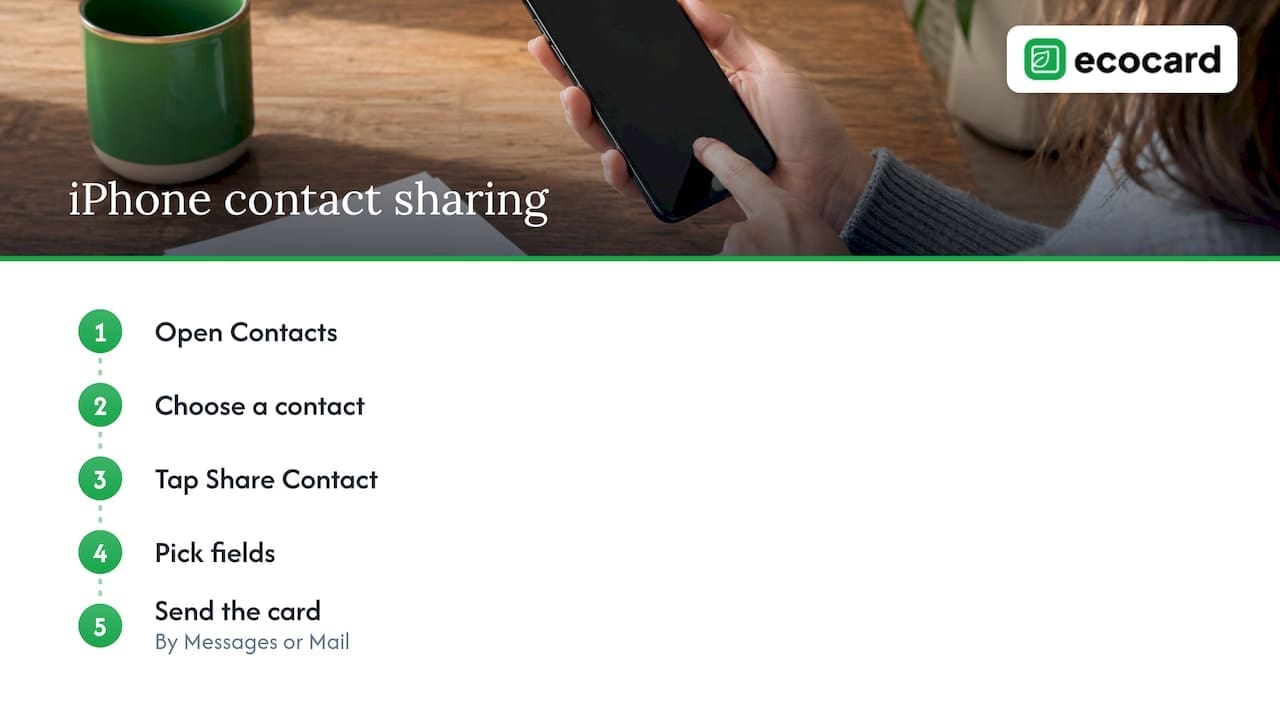
There is also a setting to be aware of. Macworld explains that Share Name and Photo lives under Settings, then Messages, where you can limit automatic sharing to people in your contacts or choose Always Ask. It also reports that people who already have your details may be prompted to update their saved contact when the shared name or photo differs. That nudge can help the update land.
On Android, the equivalent is sharing your contact from the Contacts app, or sending your number in a message that people can tap to save.
If you are the one updating someone else’s number
When a friend or client sends you a new number, replace the old entry instead of adding a second one, or you’ll end up with duplicates and the wrong number attached to a conversation.
- iPhone: open Contacts, tap the contact, tap Edit, and update the details.
- Android: open Contacts, tap the contact, tap Edit, enter the new number and tap Save. Contacts saved to your Google Account sync to Google Contacts and your other Android devices.
If the person is a professional contact, take a moment to note the date and reason in the contact’s notes. It helps later when you can’t remember which number was current when.
Update your business and online listings
A new number has a long tail. Websites, social profiles, email signatures, invoices and directory listings all carry it. If you run a business, the official register matters too. The New Zealand Business Number service says MyNZBN lets authorised users update a business phone number, email, website and contact addresses on the NZBN Register, and that keeping details current helps suppliers, customers and government rely on accurate information.
A practical sweep list:
- Email signature, on every device and in webmail.
- Website contact page and footer.
- Google Business Profile and social media bios.
- Invoice and quote templates.
- Supplier and customer portals.
- Your NZBN record, if you have one.
- Printed material that still carries the old number.
Our article on company contact directories online covers how to find and verify listings, which is useful when you suspect an old number is still showing somewhere.
Perspective: stop re-notifying, start pointing people to one place
Every number change shows the same weakness: your details are copied into other people’s phones, email signatures and printed cards, and each copy goes out of date the moment something changes.
Our view is that the lasting fix is not a better announcement. It’s having one live place that people trust to be current. That is why EcoCard is built around cards that update live: change your number once, and anyone who opens your card link or scans your QR code sees the current details. They don’t have to install an app to view it.
For businesses, the same idea scales. A central admin can keep branding and staff details consistent, so a switchboard change or a new mobile for a role doesn’t mean chasing every person to fix their own signature and card. We’d rather you spend your time on the conversations that matter than on a month of “please update my number” messages.
Chris
Keep your networking contacts from slipping away
A number change is also a good moment to tidy the contacts you want to keep. SEEK New Zealand suggests a simple networking tracker that records name and organisation, role, where you met, topics discussed, follow-up actions and next contact date. It also recommends noting how each person prefers to be contacted and reviewing the list regularly so the information stays current. Its broader point is worth remembering: a smaller group of trusted professional relationships often beats a long list of people you met once.
For the follow-up step itself, see our guide to same-day networking follow-ups. If your address book has become unwieldy, how to organise business contacts walks through the clean-up.
Make your number easy to find, then stop chasing
Once the messages are out, reduce the future work. A digital business card gives people a link or QR code that always shows your current number, along with your email, socials and portfolio. Put that link in your email signature and social bios, and you’ve got a single address to give out instead of a number that might change. Our guides on choosing and sharing a digital business card URL and how a card works without an app cover the practical side. Compare it with a signature in email signatures versus digital cards.
Keep your details current with EcoCard
EcoCard lets you build a digital card with your contact details, social profiles and business links, share it by QR code, direct link or NFC tap, and update it whenever something changes. Individuals pay NZ$9.99 per month, and additional EcoCards for other roles are NZ$4.99 per month. For businesses, plans run from Starter at NZ$19.99 per month, through Business at NZ$49.99 and Teams at NZ$99.99, with Enterprise available on request. Central management means branding and details stay consistent across staff cards, and onboarding and offboarding are handled in one place.
See the EcoCard pricing page to pick a plan, or look at EcoCard for Business if you manage a team.
A short checklist
- Sort contacts into must, should and later groups.
- Update bank, email recovery, government and security settings first, and move off SMS-only codes where you can.
- Keep the old number running until the switch is complete.
- Send personal messages with your name, both numbers and the changeover date.
- Use WhatsApp’s Notify Contacts or iPhone’s Share Contact for the rest.
- Update signatures, profiles, listings and your NZBN record.
- Follow up with key clients after a week or two.
- Point everyone to one live source of your details.
FAQ
Should I text from my old number or my new one?
If you can, send from the new number so the message arrives from the number you want saved, or send from both. A heads-up from the old number a week ahead, followed by a confirmation from the new one, works well for client-facing contacts. Always include both numbers so recipients know which entry to replace.
Does WhatsApp tell my contacts when I change number?
Yes, if you switch on Notify Contacts in Change Number. You can choose all contacts, only those you have chats with, or a custom list, and group chats are notified automatically. WhatsApp still recommends telling people yourself beforehand and asking them to save the new number.
How do I send my new number to someone on iPhone?
Open Contacts, tap your own card or the contact you want to share, then tap Share Contact. Choose the fields to include, such as name and phone number, and send by Messages or Mail. The recipient can then save or update the entry in one tap.
How long should I keep the old number active?
Keep it until you’re confident your key contacts and accounts have moved. Don’t cancel it straight away, and if you’re porting a number, wait until the port is confirmed. Adding a voicemail greeting that gives the new number for about a month helps anyone who still calls the old line.
How do I stop having to tell everyone again next time?
Give people a link or QR code that always shows your current details instead of relying on saved copies. A live digital card does this: you update it once and anyone opening it sees the change. Put that link in your signature and profiles.
Sources
- WhatsApp Help Center: How to change your phone number
- WhatsApp Help Center: About changing phone numbers
- Golden Years Magazine NZ: Changing Your Phone Number? Update These First
- ASH NET: Porting your phone number
- DBS: Checklist of things to do when you change your phone number
- Cradle: Phone numbers in New Zealand
- Notifying Customers: How to Communicate Number Changes
- Cellular News: How To Share a Phone Number
- Macworld: Provide a new profile photo and name in iMessage
- Apple Support NZ: Edit contacts on iPhone
- Google Contacts Help: Edit or delete contacts
- New Zealand Business Number: Updating your NZBN details
- SEEK New Zealand: Keep track of your network
Recommended
- How to Organise Business Contacts So You Can Find Them
- Paste Ready NZ Phone Formats for Business Cards
- Contactless Networking in NZ: Tap, Scan and Follow Up
- WhatsApp Digital Business Card: How to Send One in NZ
This article was produced with AI assistance and reviewed for accuracy. It is provided for general information only and is not professional advice.

