


UTM tracking works on business cards when the card leads to a web address you control. You add a short tag to that address, such as ?utm_source=card&utm_medium=qr&utm_campaign=name-of-campaign. Google Analytics then reports the visit under that source, medium and campaign instead of lumping it into “direct”. That is the whole idea. The detail that makes it useful is how you name the tags, how you give each card or event its own tag, and how you read the report afterwards.
This guide walks through each step for printed cards, QR codes and digital business cards, with examples you can copy.
TL;DR
- UTM tags are short labels added to a URL. They tell your analytics tool which source, medium and campaign a visit came from.
- Use source, medium and campaign every time. Add content to tell cards, people or events apart. Skip term unless you run paid keywords.
- Tag the destination URL before you generate the QR code, keep every value lowercase, and test the code at print size on iPhone and Android.
- UTM tracking counts visits that load your page, not raw scans. Check results in Google Analytics under Acquisition > Traffic acquisition.
- Only tag links that point to your site from outside it. Never tag links between your own pages.
Table of Contents
- What UTM tracking can measure on a business card
- The five UTM parameters and which ones a card needs
- Building the tagged link, step by step
- Adding UTM parameters to a business card QR code
- Tracking digital business card visits
- Reading the results in Google Analytics
- Before you print or share: a pre-flight check
- Our perspective
- Put it into practice with EcoCard
- FAQ
- Sources
What UTM tracking can measure on a business card
A UTM tag is a piece of text added to the end of a URL. According to Lob’s guide to UTM parameters, these tags let an analytics platform attribute a visit to a defined source, medium and campaign. The same guide points out why this matters offline: a QR scan or a typed personalised URL can otherwise show up as direct, referral or another broad bucket, which tells you nothing.
Business cards are exactly that kind of offline touchpoint. Someone takes your card at a trade show in Auckland, scans it on the way home, and lands on your website. Without a tag, that visit looks the same as someone typing your address from memory.
With tags you can answer practical questions:
- Did the cards handed out at last month’s expo bring more visits than the ones left at the front desk?
- Which salesperson’s card sends the most people to the booking page?
- Do visitors from cards go on to fill in the contact form?
Lob notes that UTM data can compare channels, campaigns, formats and creative versions, and can be tied to online actions such as form fills, purchases, appointments, demos and downloads. On a card, that means you can compare one placement against another and then follow the visitor to the action you care about.
One limit is worth knowing early. As GenerateOnlineQR explains, UTM tracking counts visits that reach your site rather than raw scans, so a scan that fails to load the page is not counted in GA4. Treat the numbers as people who arrived, not people who pointed a camera.
The five UTM parameters and which ones a card needs
Google’s Analytics Help lists five campaign parameters:
| Parameter | What it holds | Use on a business card? |
|---|---|---|
utm_source |
The referrer | Yes, always |
utm_medium |
The marketing medium | Yes, always |
utm_campaign |
Product, slogan or promo code | Yes, always |
utm_content |
Tells creatives or versions apart | Yes, for cards, people or placements |
utm_term |
Paid keyword | Rarely |
Google says to always use source, medium and campaign. A US government job aid from the CDC on campaign links says the same: those three are required for campaign data to be collected successfully, while content and term are optional. It defines medium as the marketing channel, source as the specific site or origin within that channel, and campaign as the individual campaign name.
For cards, that gives you a simple mental model:
- Medium is how the person met your link:
qr,nfcorprint. - Source is where the card was physically or digitally placed:
business-card,expo-booth,email-signature. - Campaign is the reason it exists:
autumn-roadshow,2026-networking. - Content is what separates one version from another: a person’s name, a card design, or an event.
A naming convention you can copy
The UseQR documentation recommends a consistent pattern for offline QR campaigns: utm_medium=qr, the physical placement in utm_source, the campaign name in utm_campaign, and the individual asset or variant in utm_content.
Applied to a Wellington consultant who hands out cards at events, it looks like this:
https://example.co.nz/book?utm_source=business-card&utm_medium=qr&utm_campaign=wellington-events-2026&utm_content=aroha-smith
Another approach comes from Trakl’s business card guide. Its per-representative example uses utm_source=qr, utm_medium=offline, utm_campaign=business-card and utm_content=jordan-lee, so the content tag identifies the cardholder. Trakl also says an event can sit in utm_content (for example a name plus the event) or be separated into utm_term while content keeps identifying the person.
Both work. What matters is picking one convention and writing it down before the first card is printed.
Building the tagged link, step by step
- Start with the final landing page. Choose the page you want the card to open: a booking page, a portfolio, a contact form. Use the real final URL, not one that redirects several times.
- Add the parameters. Google documents the format: a
?separates the base URL from the parameters,&separates each pair, and=joins each parameter to its value. You can write it by hand or use Google’s free Campaign URL Builder, which the CDC also recommends so links contain the intended parameters. - Keep values consistent and lowercase. Google recommends consistent lowercase values. ScanOrbit’s GA4 guide adds that GA4 treats QR, qr and Qr as separate entries, and suggests hyphens instead of spaces or underscores in values, plus meaningful campaign dates and descriptive sources.
- Check the result. Open the full URL in a browser and confirm the page loads and the parameters are intact.
- Generate the QR code from the tagged URL. Details are in the next section.
If you want a deeper look at the measurement side, this walkthrough on how to track QR code scans is a handy companion to the steps above.
A short checklist for the tag values
- Write all values in lowercase.
- Use hyphens between words.
- Put the year or month in campaign names so you can compare runs.
- Never put personal details such as a mobile number or email address into a tag. URLs travel and get stored in analytics, browser history and logs.
- Keep a shared spreadsheet of every tag you have used. Naming drift is the most common reason reports become unreadable. ScanOrbit’s view is that naming governance matters as much as link construction, because inconsistent capitalisation fragments GA4 reports.
Adding UTM parameters to a business card QR code
The rule is simple: tag the destination first, then make the code. UseQR’s example shows a destination such as https://example.com/spring?utm_source=poster&utm_medium=qr&utm_campaign=spring26&utm_content=window, built either with a generator’s UTM fields or by assembling the query string manually.
There are three ways to do it:
- Paste the full tagged URL into the QR code’s destination field. QRKit describes this as building the URL in Google’s Campaign URL Builder and pasting the complete result, parameters included.
- Use a generator with UTM fields. QRTRAC’s help page says you enter the destination plus source, medium and campaign values, and the system appends the tags and shows the resulting URL so you can check it before saving.
- Use a redirect-based code. Uniqode’s documentation says custom parameters are passed through to the redirected website, and the website can then use them in a tool such as Google Analytics.
Direct contact code or web link?
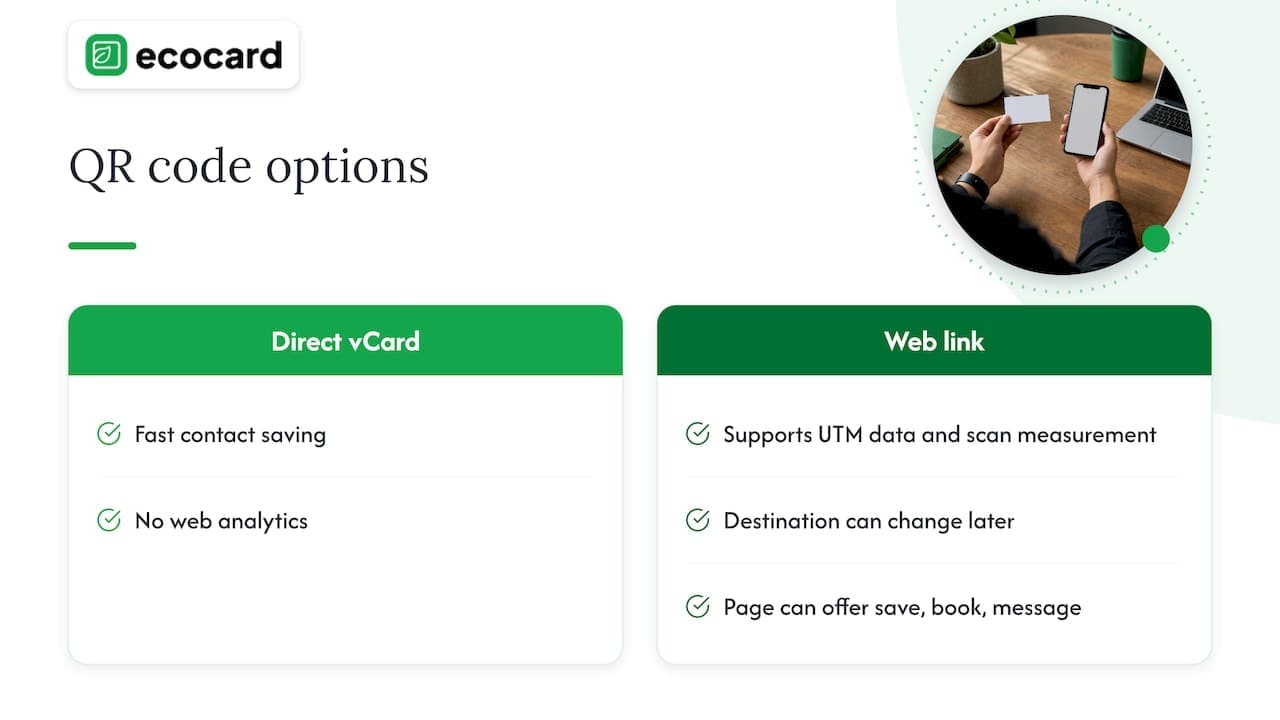
A QR code on a business card can hold two very different things. One is a contact file (a vCard) encoded directly. The other is a web address. Trakl describes the URL or redirect pattern as the tracking-friendly choice for business cards, because the destination can be changed later and scans can be measured. A vCard encoded straight into the code is faster for saving a contact, but it carries no web analytics.
In short: if you want UTM data and the freedom to change where the card points, use a web link. If the only goal is the quickest contact save, a direct vCard does that job. Many professionals pick the web link, because a page can offer both: a save-contact button and a way to book or message you.
Our own guide on QR code business cards that are ready for print covers size and layout, and the NZ marketers’ playbook on tracking QR code scans goes further on proving return.
Tracking digital business card visits
A digital card changes the picture a little. The card itself is a live page, so people reach it through a QR code, a direct link or an NFC tap. You can still add UTM tags to the links that lead to your own website from that card, such as a portfolio, a booking page or a product page. Those links come from an outside source, so tagging them is correct.
A workable pattern for a digital card:
| Link on the card | Suggested tags |
|---|---|
| Website homepage | utm_source=digital-card&utm_medium=link&utm_campaign=profile |
| Booking page | utm_source=digital-card&utm_medium=link&utm_campaign=booking&utm_content=aroha-smith |
| Event-specific offer | utm_source=digital-card&utm_medium=link&utm_campaign=expo-2026&utm_content=aroha-smith |
One caution from Plausible: use UTM tags on links pointing to your site from external sources. Adding them to links between your own pages can overwrite the original referral attribution. So tag the links on the card and in your emails, but never the menu links inside your website.
NFC works the same way. If you set up tap cards for a team, the tap can open a single link, and the tagging happens at the destination. Our posts on NFC business card setup for teams and why QR still matters when taps fail explain how to keep one link behind every card.
Reading the results in Google Analytics
Once visits start arriving, Google Analytics 4 shows them. Per Google’s documentation, you can view Session source/medium, Session medium, Session source and Session campaign in the Acquisition > Traffic acquisition report. Campaign parameters appended to destination URLs let Analytics identify the referring campaign, and their values appear in that report.
ScanOrbit suggests looking for rows such as flyer / qr or poster / print in Session source / medium. It adds that Session campaign can be used as an extra dimension, and that the Explore tool can combine source, medium, campaign and conversion events when you want a deeper cut.
Questions to ask of the data
- Which source brings the most visits? Compare
business-cardagainstemail-signatureorexpo-booth. - Which person or card version performs best? Filter by content. Plausible explains that UTM reports can be filtered by medium, source, campaign, term and content, so visits and conversions can be compared by tagged source or creative.
- Which event paid off? Give each event its own campaign or content value and compare conversions after the event, not just visits.
- Do visits turn into actions? Mark your booking or enquiry form as a conversion event, then see which campaign values lead there.
For small volumes, expect modest numbers. A set of 200 cards will not give you a statistically tidy answer, but it will show you which placements produce any traffic at all, and that is often the decision you need to make.
Before you print or share: a pre-flight check
Google’s guidance and the practical advice from QR vendors combine into a short list:
- One tagged destination per physical placement. A card in your wallet, a card left at a cafe and a card on a stand each get their own
utm_contentorutm_source. - Test every code at real print size on both an iPhone and an Android phone. Do it on the actual stock, not a screen mock-up.
- Confirm the page loads quickly on mobile data. Because only completed page loads are counted, a slow page quietly shrinks your numbers.
- Lock the naming. Lowercase, hyphens, agreed values. Share the convention with everyone who prints or sends cards.
- Check a live visit in GA4. Scan your own card, then look for the visit in the real-time view or the next day’s traffic report before ordering a big print run.
- Think about privacy. Tell people what your page collects if you capture details through a form, and keep tags free of personal information.
If you run a team, point everyone to a single managed link instead of tagging a separate address by hand. Our guide on employee digital business cards explains how that works for onboarding and offboarding.
Our perspective
We built EcoCard around one belief: the card should not be the thing that goes out of date. A printed card with a tagged QR code tells you something useful, but the moment someone changes role, phone number or brand colours, the printed version is wrong and the tag is stuck to it.
That is why we favour a live link behind every card. When the destination is a page that can be updated, you can change what people see without reprinting, and the same card keeps working for the next event, the next campaign and the next role. For businesses, central management means every employee card carries the same branding and the same approach, and when someone leaves, their card is dealt with the same day.
Tracking is the part many teams leave until later. Our advice is to decide your naming convention first, then decide which links on the card deserve tags: the booking page, the portfolio, the offer. Treat the card as the start of a follow-up, not the end of a handshake. Recipients do not need to install an app, so there is nothing between the scan and your page.
This pairs with the usage analytics in the platform. Use those to see how your cards are used, and use UTM tags to see what happens once people reach your website.
Chris
Put it into practice with EcoCard
If you want one card that updates live, shares by QR code, link or NFC tap, and can be managed across a whole team, EcoCard is built for that. Individual plans start at NZ$9.99 per month, additional EcoCards are NZ$4.99 per month, and business plans run at NZ$19.99 (Starter), NZ$49.99 (Business) and NZ$99.99 (Teams) per month, with Enterprise available on request. You can see what each plan includes on the EcoCard pricing page.
Not sure which plan fits? Our features overview and EcoCard for Business page show what central management looks like for teams, and the digital business card examples give you design ideas for the page your tagged link opens.
FAQ
What are the five UTM parameters?
They are utm_source, utm_medium, utm_campaign, utm_term and utm_content. Google says to always use source, medium and campaign. Content helps you tell versions apart, and term is meant for paid keywords, so most business card links leave it out.
How do I see UTM tracking in Google Analytics?
Open GA4 and go to Acquisition > Traffic acquisition. There you can view Session source/medium, Session medium, Session source and Session campaign. Look for the values you put in your tags, such as business-card / qr.
Do UTM tags work on QR codes?
Yes. Add the parameters to the destination URL first, then generate the QR code from that full address. Some generators offer UTM fields and build the string for you. Either way, UTM tracking counts visits that reach your site, not every scan.
Should I use a vCard QR code or a web link?
Use a web link when you want analytics and the ability to change the destination later. A vCard saves a contact fastest, but it gives you no web analytics. Many professionals choose a web link that offers a save-contact button on the page.
Is UTM tracking still worth using?
Yes, wherever a visit would otherwise be hidden in direct traffic. Printed cards, posters and event material are the clearest cases. Keep the naming tidy and the data stays useful.
Sources
- URL builders: Collect campaign data with custom URLs, Google Analytics Help
- Tracking Website Engagement Using Campaign Links, CDC
- How to add UTM parameters to a QR code, UseQR
- UTM Parameters: What They Are and How to Track Them, Lob
- QR Code Marketing: Strategy, Campaign Plan and Tracking, GenerateOnlineQR
- How to Track QR Codes in Google Analytics (GA4), ScanOrbit
- QR codes on business cards: size and tracking rules, Trakl
- Google Analytics and GTM Integration for QR Codes, QRKit
- How to Apply UTM Parameters to QR Code, QRTRAC Help
- How to add custom (UTM) parameters to a QR Code, Uniqode
- How to use UTM parameters to track your campaigns, Plausible
- How to Track QR Code Scans for Smarter Campaigns
Recommended
- Contactless Networking in NZ: Tap, Scan and Follow Up
- One Tap, Live Updates: Digital Business Cards for NZ Teams
- Track QR code scans to prove ROI: NZ marketers’ playbook
- Avoid 4 Print Mistakes When Adding LinkedIn to NZ Business Cards
This article was produced with AI assistance and reviewed for accuracy. It is provided for general information only and is not professional advice.

