


Yes, NFC business cards are safe for most people, most of the time. The chip inside is passive and only passes on a link when a phone is held a few centimetres away. The real risks sit elsewhere: a tampered tag, a fake link, or a card platform that handles your details badly. This guide covers each one, in plain terms, for New Zealand professionals.
TL;DR
- NFC is short range and the card has no battery, so nobody can pull your details from your pocket as you walk past.
- The main risk is a swapped or reprogrammed tag that sends people to a fake page. Check where a tap lands before you trust it.
- The platform behind the card matters more than the chip. Look for HTTPS, clear breach handling and central admin control.
- Under the Privacy Act 2020, a business that suffers a breach likely to cause serious harm must notify the Privacy Commissioner and affected people.
- Pair every NFC card with a QR code and a plain link, so a failed tap never leaves someone stuck.
Table of Contents
- How an NFC business card actually works
- What NFC business cards can’t do
- The real risks, ranked by how likely they are
- What a tap shares, and what it doesn’t
- How to check a tap is legitimate
- Choosing a provider: what to look for
- Perspective: why we build around a link, not a chip
- Safe habits for individuals
- Safe habits for small business owners and teams
- NFC, QR code or link: which is safer?
- How EcoCard handles this
- A short checklist before you buy or tap
- FAQ
- Sources
How an NFC business card actually works
An NFC business card is a card (or fob, or sticker) with a small chip that holds a short web address. It has no battery. When a phone comes close, the phone’s reader powers the chip for a moment and reads the address. The phone then opens the page.
That design explains most of the safety story. The BBB’s guidance on NFC notes that NFC tags are passive and only transmit when they sit in a reader’s electromagnetic field, which is why a stranger can’t skim them as you pass in a crowd. NFC is also built for very short range. NIST’s mobile threat catalogue says it is typically optimised for distances of less than 4 inches, roughly 10 cm.
Two things follow:
- A well-made NFC business card does not store your life story. It stores a link. Your actual details live on a web page.
- Safety depends on what that link points to, and who controls it.
That is a different problem from payment cards, which is why comparing a business card to your bank card isn’t very helpful. If you want the wider background on taps and fallbacks, our piece on why QR still matters when taps fail goes through it.
What NFC business cards can’t do
It helps to clear up a few worries first.
- They don’t broadcast. Unlike Wi-Fi or Bluetooth, an NFC chip sends nothing until a reader is right on top of it.
- They don’t hold payment data. A business card tag is separate from the chip in your bank card or phone wallet. Tapping someone’s business card with your phone doesn’t touch your payment details.
- They don’t need an app on the receiving end. Most modern phones read NFC tags in the background and open the link in the browser. Nothing to install, nothing to approve beyond tapping the prompt.
So the fear that someone could tap your card and drain your account isn’t how this works. The more realistic threats are quieter.
The real risks, ranked by how likely they are
1. A swapped or reprogrammed tag
This is the most credible NFC risk. Cheap tags can be written by anyone with a phone, and some are not locked. A security write-up from a Cypriot telco, quoting a Kaspersky researcher, explains that tags in public places can be reprogrammed or replaced, with consequences that include redirecting people to fake websites that steal login details.
For your own card, that cuts two ways:
- If you hand out a physical card with an unlocked tag, someone could rewrite it and pass it on.
- If you tap a tag stuck on a poster, a table or a counter, you can’t know who wrote it.
Academic work has shown how far this can go on older or unpatched phones. A paper titled Steal Your Life Using 5 Cents describes hacking Android smartphones with NFC tags. Phones have been updated since, but the lesson holds: keep your phone’s software current.
2. Phishing dressed up as a tap or a scan
In New Zealand, the common digital threat is a scam that imitates a legitimate service. The Department of Internal Affairs’ Digital Messaging Transparency Report tracks the spam and scam environment, including malware campaigns. Scammers lean on urgency and current events to get people to scan codes or click links. An NFC tap is just another way to open a link, so the same habits apply.
Treat a tap like a click:
- Read the address your phone shows before you open the page.
- Be wary of any page that then asks you to log in, enter a password or install something.
- Don’t tap unknown tags in public places.
The NCSC has also warned about scams where victims are talked into installing remote access tools on their phones, as in its investment scam alert. If any page, however you reached it, tells you to install an app to “view” a card, close it.
3. A platform that handles your data badly
This is the risk people overlook. The chip is the least interesting part. The page it opens holds your name, phone number, email, role and social profiles. If the provider stores that carelessly, or can’t tell you what happens in a breach, the tap technology is beside the point.
4. Stale or orphaned cards
A printed card with your old number sits in drawers for years. A digital card has the opposite problem: a former employee’s card can keep working, and keep carrying your company’s name, long after they leave. That is a brand and privacy risk, and it is easy to prevent with the right admin tools (more on that below).
What a tap shares, and what it doesn’t
A useful way to think about it is to separate three layers.
| Layer | What it is | Main risk | Your control |
|---|---|---|---|
| The chip | A passive tag holding one link | Being rewritten or swapped | Lock the tag, buy from a trusted supplier, check it periodically |
| The link and page | Your card page, hosted by a provider | Fake lookalike pages, weak hosting | Use HTTPS, a known provider and a clear address |
| The data | Your contact details and files | Over-sharing, breach, stale details | Choose what to show, and who can edit |
Most of the safety work happens in the second and third rows. That’s good news: you control them.
How to check a tap is legitimate
Whether you’re the card owner or the person receiving one, a few seconds of checking goes a long way.
- Look at the preview. Your phone shows the web address before it opens. It should match the person’s company or card provider, not a string of random characters.
- Check for HTTPS. The padlock isn’t proof of honesty, but its absence is a red flag.
- Ask what the page wants. A contact card shows contact details. If it asks for a password, a payment or an install, stop.
- Compare with a second route. A good card also has a QR code or a short link. If both lead to the same page, you can relax.
- Know where the card came from. A card handed to you by the person is very different from a sticker on a café table.
Choosing a provider: what to look for
If you’re picking a digital card platform, treat it like any other business software that holds personal information. Under the Privacy Act 2020, the organisations that collect personal information are responsible for looking after it. The Office of the Privacy Commissioner says that if a breach has caused or is likely to cause serious harm, you must notify the Commissioner and affected people as soon as practicable.
In practice, ask any provider:
- Is everything served over HTTPS? Card pages and the admin dashboard both.
- What happens in a breach? A provider should be able to explain how it would tell you and your contacts, in line with the Privacy Act.
- Who can edit a card? Individual staff, a central admin, or both?
- Can you remove a person instantly? This matters the day someone leaves.
- Where do the details live? On the provider’s page, not baked into the chip, so you can change them without touching the card.
- Are there clear logs and controls? Accountability is easier when changes are traceable.
It’s also worth thinking about what you put on the card. A work mobile and a work email are normal. A home address is not. If you share a photo, our friends at a Kiwi photography studio have a useful guide to corporate headshot style and privacy rules in New Zealand, which is worth a read before you upload an image that will sit on a public page.
Perspective: why we build around a link, not a chip
We think the safest NFC business card is one where the chip matters least.
That’s the thinking behind EcoCard. The tap is a convenience. The card itself is a live profile, so you can change a role, a number or a brand colour once and every share reflects it. Nothing needs retagging, and nobody needs to install an app to view it.

For businesses, we think control is the real security feature. A central admin can set the branding, manage who has a card, and remove someone’s access when they leave, so an old card doesn’t keep carrying your company name. The ability to switch off a card quickly is worth more than any claim about chip encryption. In fact, be sceptical of marketing that says NFC is inherently more secure because the data is encrypted on the chip. For a business card that holds a public link, that isn’t the point.
We’d also say this plainly: no tap works every time. Phones differ, cases get in the way, and some people have NFC switched off. That’s why we pair a tap with a QR code and a direct link, so the person you’re meeting always has a way in. Our guide to NFC setup for teams with one link and no retagging shows how that looks in practice.
— Chris
Safe habits for individuals
If you carry your own NFC card or fob, a few habits cover nearly everything.
- Lock the tag if your supplier lets you, so it can’t be rewritten.
- Keep your phone updated. Old software is where the nasty tag attacks have worked.
- Put only business details on the card. Work phone, work email, LinkedIn and a portfolio link are plenty.
- Check your own card now and then. Tap it with your phone and confirm it still opens your page.
- Hand it over yourself. Don’t leave cards or stickers lying around where someone could swap them.
- Update the page, not the card. If your number changes, edit the profile. Don’t reprogram tags unless you have to.
If you’re after a simple personal setup, our guide to creating a secure, live digital business card walks through QR, link and vCard sharing.
Safe habits for small business owners and teams
Teams add a layer of risk, mostly around process rather than technology.
Set the rules once
Decide which fields staff can edit (usually phone, email, headshot) and which are fixed (company name, logo, colours, address). Central control keeps cards consistent and stops a well-meaning employee from changing the wrong thing.
Plan for people leaving
Write offboarding into your checklist. When a staff member leaves, their card should be deactivated or reassigned the same day, along with their email and software logins. The same goes for a card that redirects to a personal page.
Use one link per person
If every card points to a stable link, you never need to retag a chip when a role changes. You change the profile behind it. That’s both easier and safer, because the physical object stays the same.
Tell staff what to watch for
A short note to the team is enough: check the preview before opening, don’t scan or tap unknown tags in public, and report anything strange. The DIA report above shows how scammers use urgency and trending topics, so remind people that the same tricks work through taps and QR codes.
For more on running cards across a team, see One Tap, Live Updates: Digital Business Cards for NZ Teams and our look at digital business card benefits for teams, from analytics to privacy.
NFC, QR code or link: which is safer?
None of the three is safer in every case. They differ in what can go wrong.
| Method | Needs to be close? | Main risk | Best use |
|---|---|---|---|
| NFC tap | Yes, a few centimetres | Rewritten or swapped tag; phone without NFC | Face-to-face meetings |
| QR code | No, only in line of sight | A sticker pasted over the real code; fake lookalike pages | Print, signage, events |
| Direct link | No | Typos and lookalike addresses | Email, messages, LinkedIn |
The risk in each case is a link that goes somewhere you didn’t intend. That’s why a card that offers all three, all pointing at the same page, is more dependable than one that relies on a single method. If you use QR codes in print, our guide to making QR code business cards print ready covers sizing so they scan reliably.
How EcoCard handles this
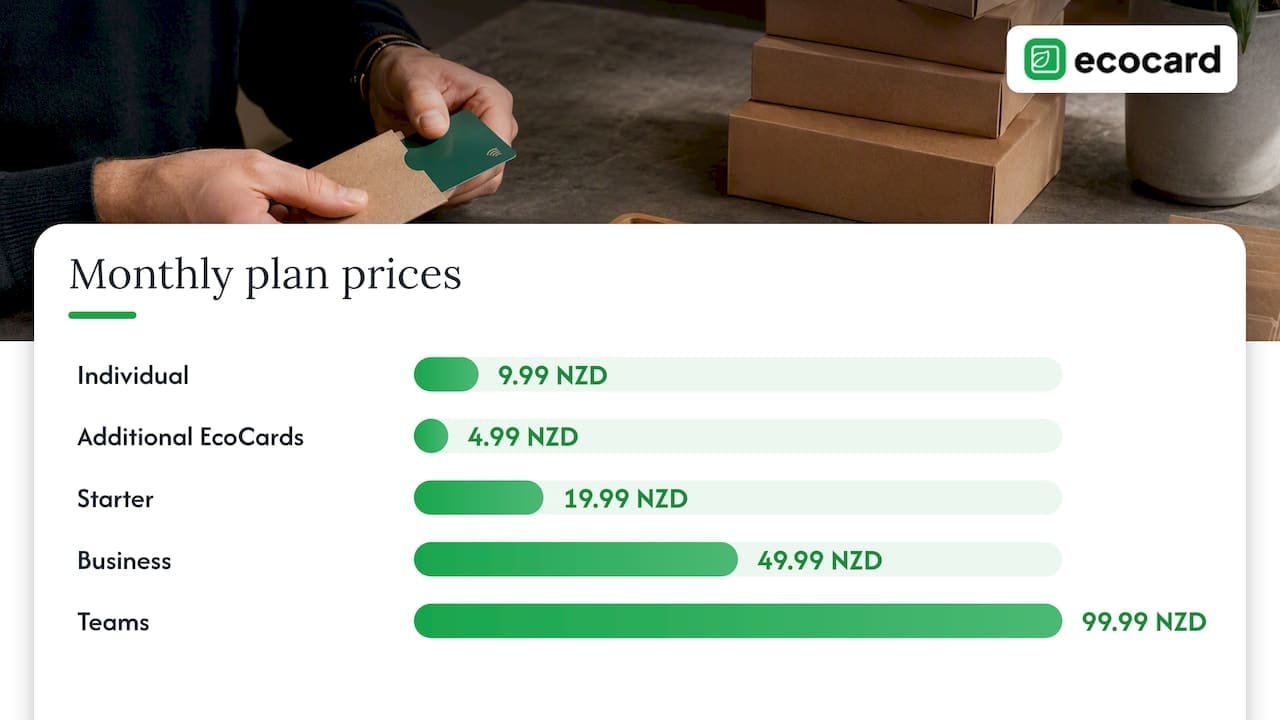
EcoCard is a digital business card platform built for New Zealand individuals, consultants and teams. You share by QR code, direct link or NFC tap, and recipients don’t need to install an app. Details update live, so a change to a role or number flows through without reprinting or retagging. For businesses, central admin management lets you keep branding consistent and handle onboarding and offboarding in one place.
Plans are billed monthly and published on our pricing page:
| Plan | Price |
|---|---|
| Individual | 9.99 NZD per month |
| Additional EcoCards | 4.99 NZD per month |
| Starter | 19.99 NZD per month |
| Business | 49.99 NZD per month |
| Teams | 99.99 NZD per month |
| Enterprise | Contact us, no published price |
If you manage staff cards, start with EcoCard for Business. If it’s just you, the Individual EcoCard is the simplest route.
A short checklist before you buy or tap
- The chip holds a link, not your details.
- The page loads over HTTPS from an address you recognise.
- A QR code and direct link back up the tap.
- The provider can explain its breach process in line with the Privacy Act 2020.
- An admin can remove a card immediately.
- You share only business details.
- Your phone is up to date.
FAQ
Is NFC secure?
The technology is secure enough for sharing a link. NFC only works at very short range, and a passive tag has no power of its own. The weak points are a tampered tag, a fake page or a careless provider, not someone intercepting your card from across the room.
Can someone steal my information by tapping my card?
Not from a properly set up business card. The tag holds a web address, and anyone who taps it sees what your public page shows. Keep private details such as a home address off the page, and the worst a stranger can get is what you chose to share.
Can an NFC tag be changed after I buy it?
Often, yes, unless it has been locked. That’s why it’s worth buying from a trusted supplier, locking the tag if you can, and checking occasionally that it still opens your own page. Using a live profile behind a stable link also means you rarely need to rewrite the chip.
What should I do if a tap opens a strange page?
Close it without entering anything. Don’t log in or install anything. If it came from your own card, replace the tag and tell the people you’ve given it to. If you think personal information has been exposed, the Privacy Commissioner’s guidance on breaches explains when and how to notify.
Are NFC business cards safer than QR codes?
Neither is safer across the board. NFC needs closeness, which makes casual scanning from a distance harder, while QR codes can be covered by a fake sticker. The best setup offers both, plus a plain link, all leading to the same page.
Sources
- BBB: What to know if you’re using NFCs
- NIST Mobile Threat Catalogue: Communication mechanisms
- Primetel: Malicious NFC tags
- Steal Your Life Using 5 Cents: Hacking Android Smartphones with NFC Tags
- DIA: Digital Messaging Transparency Report 2022
- NCSC: Investment scam linked to remote access
- Office of the Privacy Commissioner: Privacy breaches
Recommended
- NFC Business Cards: Why QR Still Matters When Taps Fail
- NFC Business Card Setup for Teams: One Link, No Retagging
- 6 Digital Business Card Benefits for Teams, From Analytics to Privacy
- One Tap, Live Updates: Digital Business Cards for NZ Teams
This article was produced with AI assistance and reviewed for accuracy. It is provided for general information only and is not professional advice.

