


Contactless networking means swapping contact details without handing over paper: you tap a phone on an NFC card, or the other person scans a QR code, and your current details open on their screen. It works at a trade show, a Chamber of Commerce breakfast or a site visit, and it works best when the card behind it is a live digital profile, because you can fix a typo or a new job title once and every future scan is correct. This guide covers how the technology works, where it fails, what New Zealand’s privacy rules ask of you, and how to run it as a habit rather than a gimmick.
TL;DR
- NFC (tap) and QR (scan) are the two ways to share contactlessly. Offer both, because a tap fails on some phones and a QR code fails in poor light.
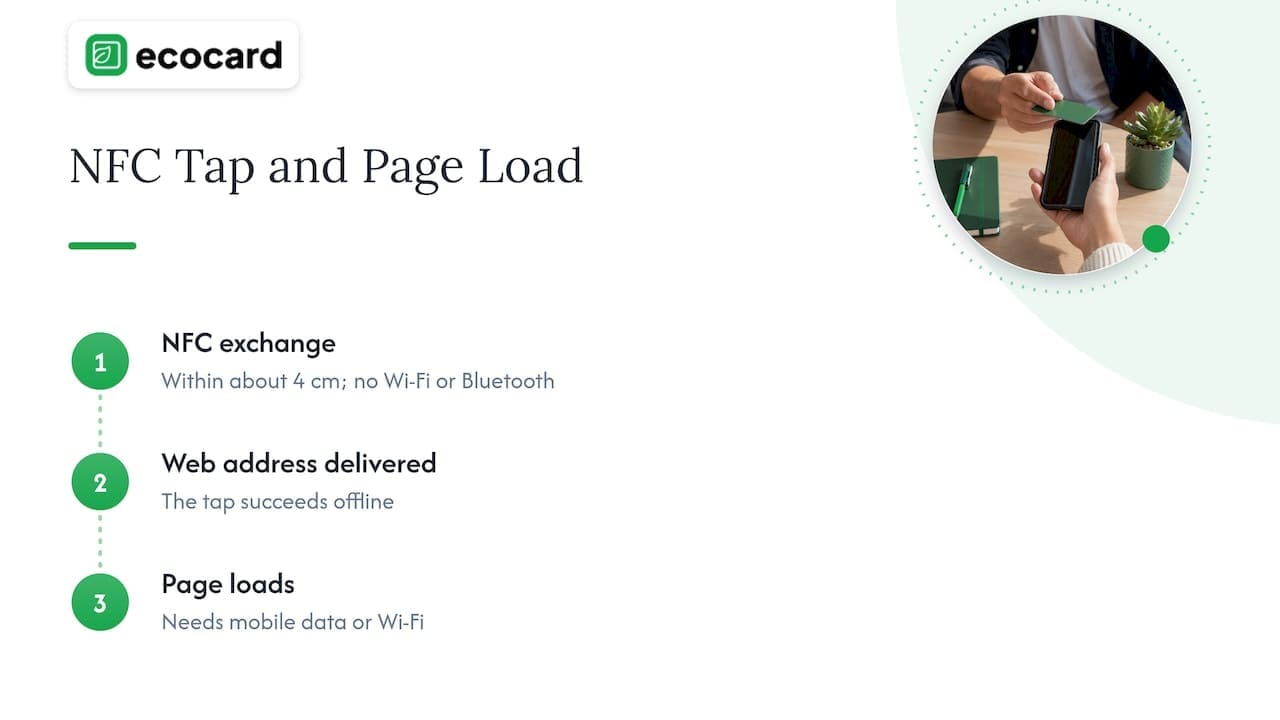
- NFC works without Wi-Fi or Bluetooth at roughly 4 cm range, but the other person still needs a connection to load your profile unless the data sits on the card itself.
- The real gain is not the tap. It is a live profile you can update once, and a follow-up routine that happens within a day.
- If you collect details back from people, the Privacy Act 2020 applies: say what you collect, why, and keep it secure.
- Teams get the most from central control of branding, roles and offboarding.
Table of Contents
- What contactless networking actually involves
- NFC or QR: which should you use?
- Why a live profile beats a static one
- Setting up contactless networking for yourself
- Running it across a team
- Perspective: the tap is the easy part
- Privacy and safety: what NZ rules ask of you
- A follow-up routine that works
- Where EcoCard fits
- A quick checklist before your next event
- FAQ
- Sources
What contactless networking actually involves
There are three moving parts, and it helps to separate them.
- The trigger. An NFC tap, a QR scan or a plain link sent by message.
- The destination. A web profile, a downloadable contact file (vCard) or both.
- The follow-up. What you and the other person do with the details afterwards.
Most articles on the topic stop at the first part. In practice the second and third decide whether the exchange was worth it. A tap that lands on an outdated page, or a scan that nobody follows up, is just a more expensive way to lose a lead.
NFC: the tap
Near field communication is a short-range radio technology. According to Android’s developer documentation, two NFC devices, or a tag and a reader, communicate when they are within about 4 cm of each other. It does not need Bluetooth, and it does not rely on Wi-Fi for the exchange itself.
That last point trips people up. The tap is offline, but what the tap delivers is usually a web address. Your contact’s phone then needs mobile data or Wi-Fi to load the page. In a basement conference venue with poor reception, a tap can succeed and the page still hang. That is one reason to carry a second route.
There is a second wrinkle. Reading a tag is easy for modern phones. Having a phone pretend to be a card is a different thing, and operating systems restrict it. Android describes host-based card emulation as a feature for apps, but it is not something you should assume works the same across every handset. So for phone-to-phone sharing, a physical NFC card or tag is the more dependable option, with the phone acting as the reader on the receiving end. Apps such as NFC21 Tools show that iPhones can read and write NFC tags, which is why a tagged card or a badge sticker can be set up and tested in minutes.
QR codes: the scan
A QR code needs no special hardware on either side. Any current phone camera opens it. That makes it the universal fallback, and often the main route at events where half the room is on different handsets.
QR codes do fail in boring, preventable ways: printed too small, low contrast, glossy stock that reflects the venue lights. If you print codes on cards, banners or badges, our guides on print-ready QR sizes for business cards and on what to check when a business card QR code will not scan walk through the specifics. Test the code from arm’s length, on two different phones, before you print a batch.
Plain links and contact files
Not every exchange is face to face. Following a call or a video meeting, a short link in a message does the same job. For people who want your details saved in their address book, a vCard file is the standard format. If imports ever go wrong, see our vCard troubleshooting guide.
NFC or QR: which should you use?
Both. The comparison below shows why they complement each other rather than compete.
| NFC tap | QR scan | |
|---|---|---|
| Hardware needed by the other person | An NFC-capable phone | Any phone with a camera |
| Speed | Near instant at close range | A second or two, once framed |
| Works with gloves, in poor light | Yes, if close | Can struggle |
| Works on a screen or poster | No | Yes |
| Can fail because of | Handset settings, phone cases, wrong tap spot | Print size, glare, contrast, bad lighting |
| Best for | One-to-one conversations | Groups, banners, email, slides |
Our article on why QR still matters when NFC taps fail goes deeper on the failure modes. The short version: the antenna sits in a different spot on different phones, thick cases can interfere, and some people simply have NFC switched off. A QR code on the same card removes the awkward pause where you say “try moving it a bit higher”.
Why a live profile beats a static one
A contactless trigger pointing at a frozen page is the same problem as a paper card, just faster. The thing that makes contactless networking worth the effort is that the destination can change after you have shared it.
Think about what goes stale on a printed card: a mobile number, a job title, a company address after a move, a new website. With a live digital card, you edit once and everybody who scans your code next week, or opens the link from last month’s email, sees the right details. For a business with a dozen staff, multiply that by every role change, every new starter and every departure.
This is also the environmental argument, and it is a practical one. A reusable card and a profile that stays accurate means no reprint when someone is promoted, and no box of obsolete cards in a drawer.
Setting up contactless networking for yourself
If you are a consultant, tradie, recruiter or sole operator, the setup is short.
- Build one clear profile. Name, role, one line on what you do, phone, email, and two or three links that matter, such as your booking page or a portfolio. Resist the urge to link everything. Our guide to designing a digital card people can scan in three seconds covers layout.
- Choose your triggers. A QR code for your phone lock screen or email signature, and an NFC card or tag for in-person meetings.
- Test on two phones. One iPhone, one Android, with and without a case. Do this before your next event, not at it.
- Decide what you ask for in return. A scan gives them your details. If you want theirs, a short lead form or a request to reply with their email is simpler than fumbling for a pen. More on the privacy side below.
- Set a follow-up window. Message within 24 hours, while the conversation is fresh.
For a fuller walkthrough, see how to create a secure, live digital business card, and for ideas on what good looks like, browse our digital business card examples.
Running it across a team
Individuals can improvise. Teams cannot, for three reasons.
- Consistency. If everyone builds their own page, you end up with five photo styles and three versions of the company tagline.
- Accuracy. Titles and phone numbers change. Someone has to own the update.
- Departures. When a salesperson leaves, their card should stop pointing at their personal mobile on their last day, not months later.
This is where central management earns its keep. An administrator can set the branding once, create cards for new starters, change roles and details across the organisation, and retire a card at offboarding. Our offboarding checklist for NZ teams places the digital card step alongside the usual access and equipment tasks, and the NFC setup guide for teams explains how to use one link per person so a physical card never needs retagging when details change.
If your business also wants those scans to feed something, such as a CRM or a follow-up sequence, it is worth looking at CRM and nurture automation for small businesses so a new contact gets a prompt reply without someone retyping details. And if your workflow is more bespoke, for example a trades business that runs on specific job-management software, custom integrations and branded apps are an option to explore once the basics are working.
Perspective: the tap is the easy part
We build EcoCard, so we see how people actually use contactless sharing, and the pattern is consistent. Most people choose a card because the tap feels modern. Six months later, what they value is that their details are right every time without thinking about it.

Our view is that the card is a front door to a profile you control. That is why we put weight on live updating, on letting one person run several cards or roles, and on central admin for businesses. A consultant who wears three hats can switch between them. A business owner can change a title for the whole team in one place. Recipients do not need to install an app to see any of it, which matters more than it sounds: every extra step you ask of a stranger at a networking event is a step they will skip.
We also think contactless should be honest about its limits. NFC is quick but not universal, QR is universal but not flawless, and neither replaces a good conversation or a prompt follow-up. Offer both, keep the profile short, and test it on someone else’s phone before you rely on it.
— Chris
Privacy and safety: what NZ rules ask of you
Contactless networking involves personal information flowing both ways, and New Zealand law takes that seriously.
When you collect details from others
The Privacy Act 2020 controls how organisations collect, use, share, store and give access to personal information. If your card or lead form collects someone’s name, email or phone number, the Act applies to what you do with it. The practical points for a small business:
- Collect only what you need for a stated purpose.
- Tell people what you are collecting, why, and how they can see or correct it.
- Keep the data secure.
- Do not add people to a marketing list just because they scanned your card. Ask first.
The Office of the Privacy Commissioner publishes the information privacy principles in full, including the principle on what to tell people when you collect their information directly. The Commissioner’s page also notes that a new principle, 3A, came into force on 1 May 2026 and covers information collected from a source other than the individual. That matters if you ever enrich contacts from elsewhere. If you are unsure how the principles apply to your business, the Privacy Commissioner’s office is the right place to ask, and a lawyer is the right person for anything contractual.
A simple, low-risk approach is a one-line note on any lead form: what you will use the details for, and a way to opt out.
When you scan others’ codes
QR codes can be misused. Consumer Protection NZ lists types of scams to watch for, and the sensible rule is the same for codes as for links in messages: only scan codes from sources you trust, and be cautious about codes stuck over other codes on posters or parking signs. If you hand out a QR code yourself, make sure it points to a page on your own domain so people can see where they are going. Our QR code accessibility audit for NZ teams covers labelling and alternatives so everyone can use your code.
A follow-up routine that works
Contactless sharing gets you into someone’s phone. The follow-up gets you into their week. A routine that suits most small teams:
- Same day: note who you met and one detail from the conversation.
- Within 24 hours: send a short message that references that detail and includes your link.
- Within a week: one useful follow-up, such as a case study or a proposed time to talk.
- After the event: check which contacts replied and which did not.
The lead capture QR code guide shows how to collect details at events without stale spreadsheets, and our piece on email signatures versus digital cards explains when to use which. Between them, you can cover both live meetings and everyday email.
Maintenance people forget
Codes and cards need checking. Printed codes fade, links break, and profiles drift out of date. A simple schedule helps: test your code a week after printing and again at six months, as set out in our guide to keeping QR codes working. Put a reminder in your calendar the day you order cards.
Where EcoCard fits
EcoCard is a digital business card platform built for people and teams in New Zealand. You can share by QR code, direct link or NFC tap, keep multiple cards, update details live, share portfolio items and documents, and see analytics on card usage. Recipients can save your details to their EcoWallet, and they do not need an app to view your card. Businesses get central admin for consistent branding and for onboarding and offboarding.
Plans are billed monthly:
| Plan | Price |
|---|---|
| Individual | NZ$9.99 per month |
| Additional EcoCards | NZ$4.99 per month |
| Starter | NZ$19.99 per month |
| Business | NZ$49.99 per month |
| Teams | NZ$99.99 per month |
| Enterprise | Contact us for details |
See the full plans on our pricing page, explore what is included on the features page, or read how EcoCard for Business handles team branding and admin. For an overview aimed at NZ teams, start with our guide to digital business cards for teams.
A quick checklist before your next event
- Profile is current and fits on one phone screen without scrolling far.
- QR code tested from arm’s length on an iPhone and an Android.
- NFC card tapped on both phone types, with and without a case.
- QR code also on your phone lock screen or in your email signature as a backup.
- Lead form or request-for-details wording says what you will do with the information.
- Follow-up message drafted in advance, ready to personalise.
- A reminder set to review your profile after the event.
Run through that list once and most of what goes wrong at events is already handled.
FAQ
Does contactless networking need Wi-Fi or Bluetooth?
The NFC tap itself does not. Android’s documentation describes it as a very short-range exchange, around 4 cm, between devices or a tag and a reader. However, if the tap opens a web profile, the other person’s phone still needs mobile data or Wi-Fi to load it. A QR code on the same card gives a second route.
Are contactless business cards the same as digital business cards?
They overlap. A contactless card is the physical or on-screen trigger, such as an NFC card or QR code. A digital business card is the profile it opens. The best setup pairs a trigger with a live profile so the details stay correct after you have shared them.
Does the other person need an app to receive my details?
Not with EcoCard. Your card opens as a web page from a QR scan, link or NFC tap, so recipients can view it straight away. They can also save your details to their EcoWallet if they choose.
Do I need to worry about the Privacy Act if I only share my own details?
Sharing your own details is simple. The Act becomes relevant when you collect information from others, for example through a lead form or by saving contacts into your systems. Tell people what you collect and why, keep it secure, and ask before adding anyone to a marketing list. For specific situations, check with the Office of the Privacy Commissioner.
Is it safe to scan QR codes at events?
Mostly, but treat them as you would a link from a stranger. Consumer Protection NZ warns about scams, so scan codes from sources you trust and check that a code has not been stuck over another one before you open the page.
Sources
- Privacy Act | Consumer Protection NZ
- Types of scams | Consumer Protection NZ
- Privacy principles | Office of the Privacy Commissioner
- Host-based card emulation overview | Android Developers
- NFC21 Tools App | App Store
Recommended
- NFC Business Cards: Why QR Still Matters When Taps Fail
- One Tap, Live Updates: Digital Business Cards for NZ Teams
- Follow Up Within Hours to Capture Leads at Events, Ops & Privacy
- Same Day Wins: Networking Follow Ups with Templates and Digital Cards
This article was produced with AI assistance and reviewed for accuracy. It is provided for general information only and is not professional advice.

